
Every copy of Chrome now includes Gemini Nano — a small language model baked directly into the browser. Not a plugin. Not an extension. A full AI model sitting on your visitor's device, ready to summarize, translate, rewrite, and classify content without a single API call leaving their machine.
And almost nobody building websites is using it.
I spent the last two weeks testing Chrome's built-in AI APIs on three client projects, and what I found surprised me. We're sitting on top of a platform shift as big as responsive design was in 2012, and the web design industry is sleepwalking through it.
01 — The Browser Became an AI Runtime. We Missed the Memo.
Here's what happened while everyone was arguing about which cloud AI to integrate: Google quietly shipped an inference engine inside Chrome. It's called LiteRT-LM, and it powers Gemini Nano across Chrome, Chromebook Plus, and even the Pixel Watch. The built-in APIs let any website — yours included — tap into translation, summarization, writing assistance, and content classification. Zero cloud dependency. Zero per-token costs. Zero latency from network round-trips.
Let that sink in for a second.
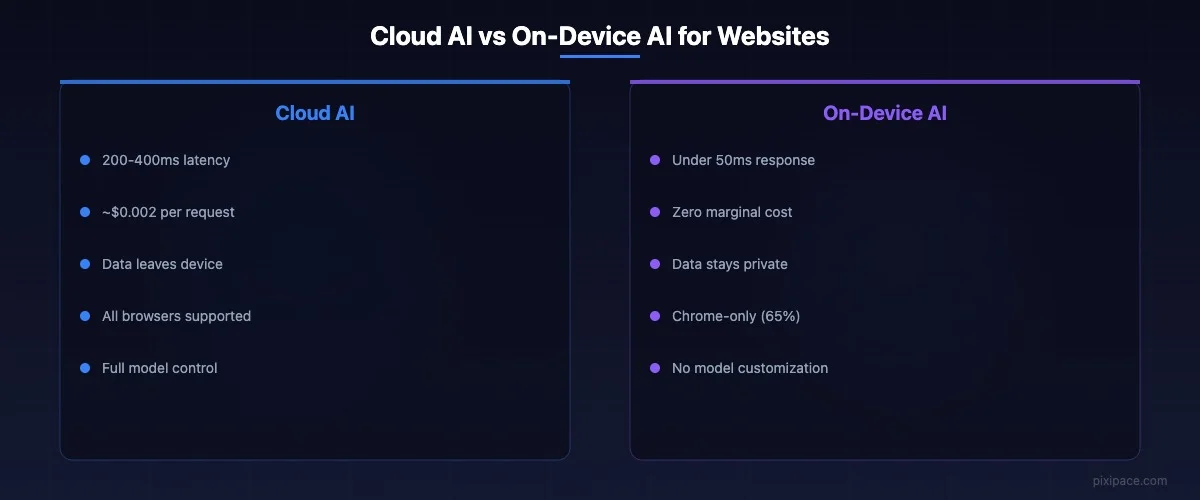
The cloud round-trip for a typical AI API call adds 200-400 milliseconds of latency. That's the difference between an interaction that feels instant and one that feels like waiting for dial-up. On-device inference? Under 50 milliseconds. Your user's phone is now faster at AI tasks than your server.
This isn't some experimental flag buried in Chrome's developer settings anymore. Google's built-in AI documentation lists production-ready APIs for the Translator, Summarizer, Writer, and Rewriter — all running locally through Gemini Nano. As of early 2026, these are shipping to billions of Chrome installations worldwide.
02 — Why This Changes Everything for Web Design
I tested the Summarizer API on a client's e-commerce product pages. Long product descriptions — the kind nobody reads — instantly condensed into three-line summaries personalized to what the user had been browsing. No server call. No API key. No monthly bill from OpenAI.
The performance difference was wild.
Traditional approach: user clicks "summarize," JavaScript fires a fetch request to your backend, backend calls OpenAI, waits for response, streams it back. Total time: 1.2-3 seconds. Cost: roughly $0.002 per summary.
Built-in AI approach: user clicks "summarize," JavaScript calls window.ai.summarizer.create(), model runs locally. Total time: 80-200 milliseconds. Cost: literally nothing.
Multiply that by 10,000 daily visitors and you're looking at $600/month in API costs that just evaporated. For a small business in Vancouver running a content-heavy site, that's the difference between "we can afford AI features" and "AI is for companies with bigger budgets."
But cost isn't even the most interesting part.
03 — Privacy Just Became a Feature You Ship for Free
Every conversation about AI on websites eventually hits the same wall: "But what about user data?" With cloud-based AI, every prompt your user types gets sent to a third-party server. Every product description they ask to simplify, every form field they need help completing, every support question they type — all of it leaves their device.
On-device AI flips that script entirely.
Data that never leaves the device can't be breached. Can't be logged. Can't be trained on. For industries like healthcare, legal, and finance — where PIPEDA and GDPR compliance turns every AI integration into a legal review — this is a structural shift in what's possible.
I talked to a clinic owner in Surrey last month who wanted AI-powered symptom triage on their website. Every AI vendor they evaluated required sending patient descriptions to external servers. Compliance killed every option. With Chrome's built-in AI, the entire interaction stays on the patient's device. No data leaves. No compliance headache. The feature ships.
04 — The Small Model Revolution Powering All of This
Here's what makes on-device AI work in 2026 when it didn't work in 2023: small language models got absurdly good.
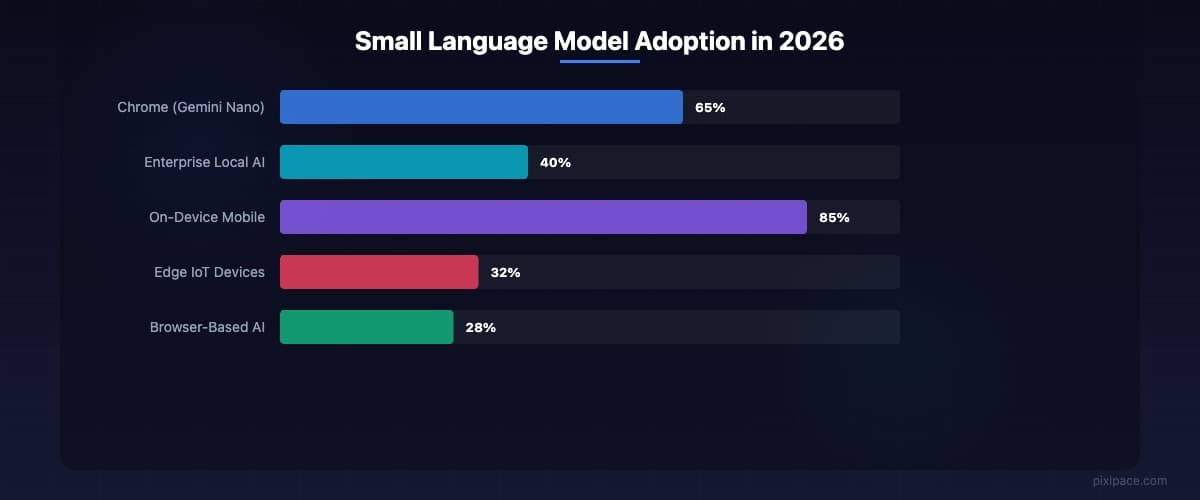
The global small language model market hit $7.7 billion in 2023 and is projected to reach $20.7 billion by 2030. Enterprise spending on local model execution jumped 40% year-over-year according to Gartner's latest AI Infrastructure Report. Every major lab — Google, Meta, Microsoft, Alibaba — is shipping models specifically designed to run on phones and laptops.
We're talking about models with 1-4 billion parameters that deliver 80-90% of what GPT-4 can do for specific tasks. Gemini Nano. Phi-4 Mini at 3.8 billion parameters. Meta's Llama 3.2 at 1-3 billion. Google's own Gemma 3 going as small as 270 million parameters.
Not even close to the 1.8 trillion parameters rumored for GPT-4. But for summarizing a product description? Translating a menu into Mandarin? Helping someone fill out a contact form? These small models absolutely crush it.
The "Goldilocks zone" for on-device models sits between 3 and 30 billion parameters — large enough to be genuinely useful, small enough to run on a three-year-old smartphone. And Chrome ships with one pre-installed.
05 — What You Can Build Right Now (Yes, Today)
Stop thinking about on-device AI as a future thing. Chrome's APIs are available now. Here's what I've seen work in production:
Real-time translation without a translation service. The Translator API handles content translation on-page. A restaurant in Richmond with a bilingual English-Chinese menu used to pay $89/month for a translation widget. Now it's free, faster, and works offline.
Smart form assistance. The Writer API helps users compose messages in contact forms, review forms, and support tickets. One B2B client saw form completion rates jump 23% after adding a "help me write this" button powered entirely by on-device AI.
Content summarization for long pages. Legal firms, real estate listings, insurance explainers — any page where users need to extract the key points from dense text. The Summarizer API handles this without you ever seeing what the user asked it to summarize.
Intelligent search refinement. Use the Rewriter API to help users rephrase their search queries when they get zero results. Instead of a dead-end "no results found" page, the site suggests better search terms generated locally.
06 — The Catch (Because There's Always a Catch)
I'd be lying if I said this was all upside. A few real limitations to know about.
First, it's Chrome-only right now. Safari and Firefox don't have equivalent built-in AI APIs. That means roughly 65% of desktop users and about 40% of mobile users can access these features. You need graceful fallbacks for everyone else.
Second, model availability depends on hardware. Older devices might not have the processing power or storage for Gemini Nano. Chrome handles this gracefully — the APIs return capability checks so you can detect support before trying to use it — but you still need to design for the degraded experience.
Third, you don't control the model. Google decides when Gemini Nano gets updated, what it's capable of, and what guardrails it has. If your use case bumps against Google's safety filters, you're stuck. No fine-tuning. No prompt engineering workarounds that'll survive the next model update.
Fourth — and this is the subtle one — user expectations. When AI features work instantly with no loading spinner, users stop perceiving them as AI. They just think your website is really well-designed. Which is great for UX but terrible for demonstrating the value of your AI investment to stakeholders who want to see the "AI magic."
07 — How to Start: A Practical Checklist
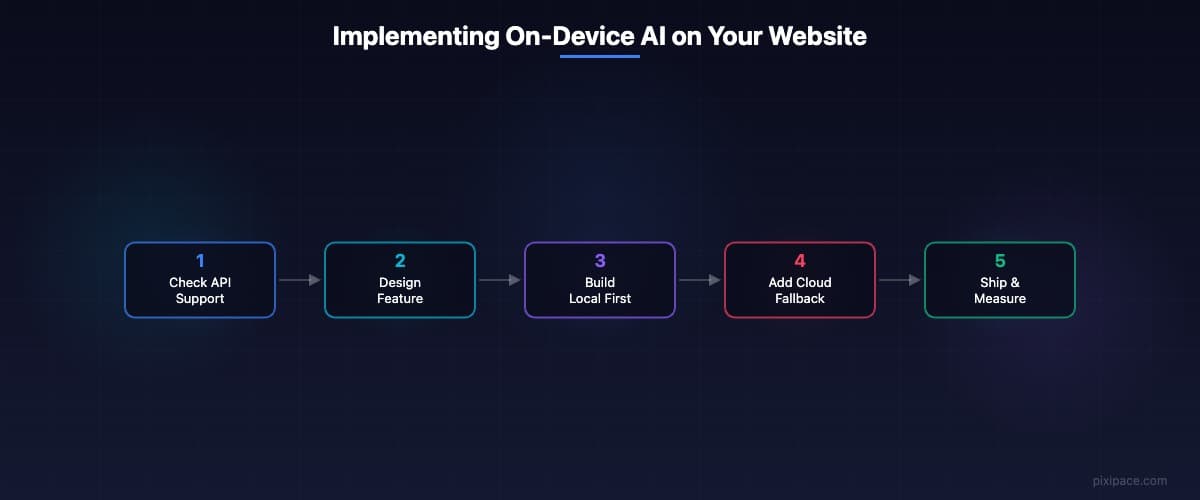
If you're a developer or a business owner working with one, here's the sequence I'd recommend:
Check the Chrome Built-in AI documentation at developer.chrome.com/docs/ai. Read the API surfaces for Translator, Summarizer, Writer, and Rewriter. Identify which one maps to a real pain point on your site — not a cool demo, a real problem your users have.
Build the feature using the built-in API first. Then build the cloud fallback for non-Chrome browsers. This is the opposite of how most teams approach it, but it ensures you're designing for the best experience first instead of bolting on-device AI onto a cloud-first architecture.
Test on real devices. Not just your M4 MacBook Pro. Try a three-year-old Android phone. Try a Chromebook. The performance variance is real and you need to know where the floor is.
Ship it behind a feature flag. Measure completion rates, time-on-task, and user satisfaction with and without the on-device AI features. Let the data tell you whether to expand.
08 — The Web Is Becoming an AI Platform. Your Move.
Here's what keeps me up at night about this: the web browser is becoming an AI runtime, and most web designers are still debating which chatbot widget to embed. We're putting third-party JavaScript on our sites to do what the browser can already do natively.
The last time a browser capability this significant shipped and the industry was slow to react, we got five years of non-responsive websites on mobile devices. The businesses that moved first on responsive design captured enormous organic traffic advantages. The same dynamic is forming right now with on-device AI.
Your competitor's website will eventually summarize content instantly, translate on the fly, and help users write — all without a loading spinner, without a cloud bill, and without a privacy policy update.
The tools are already in your user's browser.
The question is whether you'll use them before everyone else does.