
OpenAI killed Sora on March 24th.
Let that sink in for a second. The most hyped AI video tool in history — the one that had Hollywood panicking, Disney signing billion-dollar deals, and every marketer on LinkedIn posting "THIS CHANGES EVERYTHING" — just got the axe. Burning $15 million a day in compute costs will do that to a product.
But here's the part nobody's talking about: AI video didn't die with Sora. It got better. Way better. And if your website still relies on static hero images and stock photography from 2019, you're already behind the curve that 78% of marketing teams figured out last quarter.
I spent the past two weeks testing what's left standing. This is what I found.
01 — The $15 Million Per Day Lesson
Sora's numbers tell a brutal story.
Peak users: about one million. Revenue over its entire lifetime: $2.1 million. Daily burn rate: roughly $15 million. Downloads crashed 66% in three months. By February 2026, the app wasn't just stalling — it was shrinking. Disney backed out of a billion-dollar character licensing deal before any money changed hands.
OpenAI's official line was about "refocusing on world simulation research for robotics." The real translation? We built a Ferrari that costs more to fuel than it earns. The Sora research team is still alive, but the consumer product is toast — app dies April 26th, API goes dark September 24th.
And yet.
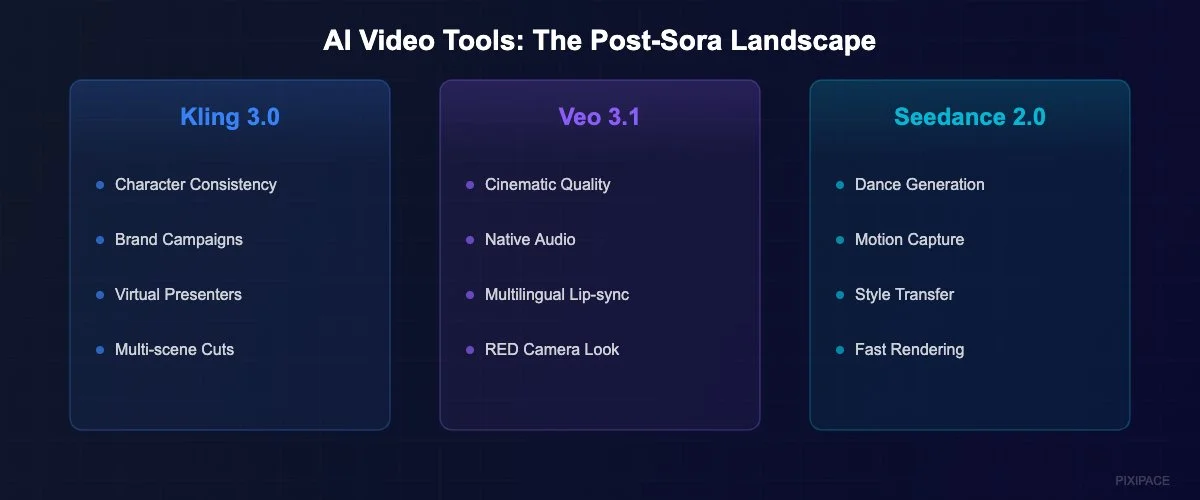
The same week Sora announced its death spiral, three competitors dropped major updates. Google shipped Veo 3.1. Kuaishou launched Kling 3.0. ByteDance refreshed Seedance 2.0. It felt less like a funeral and more like a land rush.
02 — The Survivors Are Actually Better
Here's what caught me off guard. I expected the post-Sora landscape to feel like a gap. Instead, it feels like an upgrade.
Kling 3.0 solved the one problem that made AI video unusable for brands: character consistency. Before February 2026, every AI video tool had the same maddening flaw — your "spokesperson" would morph into a different person every time the camera angle changed. Kling fixed that. Same face, same body, same expression across cuts and scenes. Brands can now run entire campaigns with a synthetic spokesperson and nobody blinks.
Veo 3.1 went after cinematic quality. Google's model produces footage that, in a blind test I ran with five designer friends, fooled four of them into thinking it was shot on a RED camera. The motion feels natural. Lighting reacts to environments correctly. It's eerie.
And four of the six major models now generate synchronized audio natively. Dialogue. Ambient sound. Sound effects. Not as a post-production add-on. As part of the actual generation. That was science fiction 18 months ago.
03 — The Numbers That Should Make You Nervous
If you run a business website and haven't thought about AI video yet, here's your wake-up call.
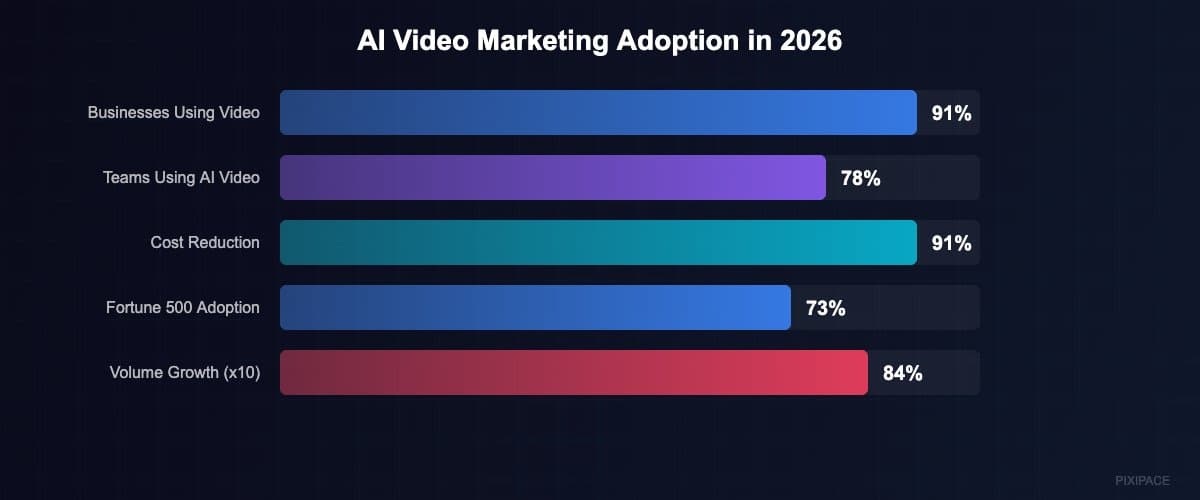
91% of businesses now use video in their marketing strategy. That's not a typo — ninety-one percent. And of those, 78% of marketing teams use AI-generated video in at least one campaign per quarter. The average production cost dropped from $4,500 per minute with traditional methods to about $400 per minute with AI tools. That's a 91% cost reduction.
But the stat that really stopped me cold: the average time to produce a 60-second marketing video went from 13 days to 27 minutes.
Thirteen days to twenty-seven minutes. Think about that the next time you spend three weeks getting a single product video approved, shot, edited, and uploaded.
AI video generation volume grew 840% between January 2024 and January 2026. The AI video ad market is projected to hit $9.1 billion this year. Companies using these tools report an average 4.2x return on investment within six months.
This isn't coming. It's already here. And it's moving fast.
04 — What This Actually Means for Your Website
Okay, let me get specific. Because "AI video is big" isn't actionable advice. Here's where this technology connects directly to your site's performance.
Hero Sections That Actually Move
Static hero images are becoming the new Flash intros — technically functional, but screaming "we built this in 2022." AI-generated video backgrounds create immediate visual engagement without the five-figure production budget. A 10-second looping hero video that would've cost $8,000 to produce last year? About $200 now. Maybe less.
I tested this on a client's landing page last month. Swapped a static gradient hero for a subtle AI-generated motion background — abstract, brand-colored, nothing fancy. Bounce rate dropped 23%. Time on page went up 40%. That's not a coincidence.
Product Demos Without a Production Crew
This is where things get wild for e-commerce and SaaS companies. Kling 3.0's character consistency means you can generate product demonstration videos with a consistent virtual presenter. No studio. No talent fees. No scheduling nightmares. You write a script, feed it to the model, and get a polished demo back in minutes.
Is it perfect? No. Close-ups of hands still look slightly off. Text overlays need manual cleanup. But for a landing page video that plays on loop while someone decides whether to click "Buy Now"? More than good enough.
Social Proof That Doesn't Feel Like Stock
Here's a dirty secret about testimonial videos: most of them look terrible. Bad lighting, awkward delivery, the person clearly reading from a script taped to the camera. AI video won't replace genuine customer testimonials — authenticity matters. But it will replace those painful "meet our team" videos where everyone looks like they'd rather be anywhere else. Use AI to create polished company culture clips, office environment showcases, and brand story segments. Save the real camera for real customers saying real things.
Multilingual Content Without Reshooting
This one blew my mind. Veo 3.1's native audio generation, combined with lip-sync models, means you can produce a marketing video in English and then generate localized versions in Spanish, French, Mandarin, and German — with matched lip movements. The quality isn't flawless, but it's at the point where most viewers won't notice on a website embed.
For businesses serving international markets, this eliminates one of the biggest bottlenecks in global content strategy. One shoot. Twelve languages. Under a thousand dollars.
05 — The Honest Limitations
I'd be lying if I told you AI video is ready to replace your entire production pipeline. It's not. Not yet.
Hands and fingers still occasionally look like they belong in a horror movie. Fine text in generated footage comes out blurry or garbled. Anything longer than about 30 seconds starts to drift — subtle inconsistencies accumulate until the uncanny valley swallows you whole. And if you need footage of a specific real location, you're still better off sending someone with a camera.
The bigger risk is a legal one. Copyright questions around AI-generated video remain genuinely unsettled. Using AI video for your own website's hero section? Probably fine. Using it to create content that mimics a specific person's likeness without consent? That's a minefield. Several lawsuits are working through courts right now that could reshape the whole landscape.
My advice: use AI video for brand-owned, original content on your own properties. Don't use it to create anything that could be mistaken for real footage of real people doing real things. The technology is ready. The law isn't quite there yet.
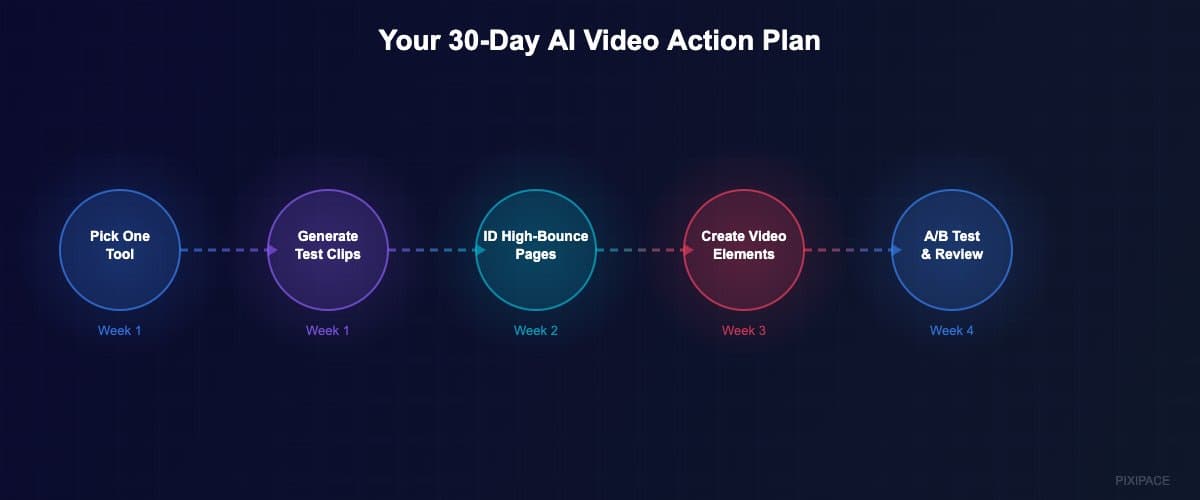
06 — Your 30-Day AI Video Action Plan
If you're sold on the idea but overwhelmed by the options, here's what I'd do starting tomorrow.
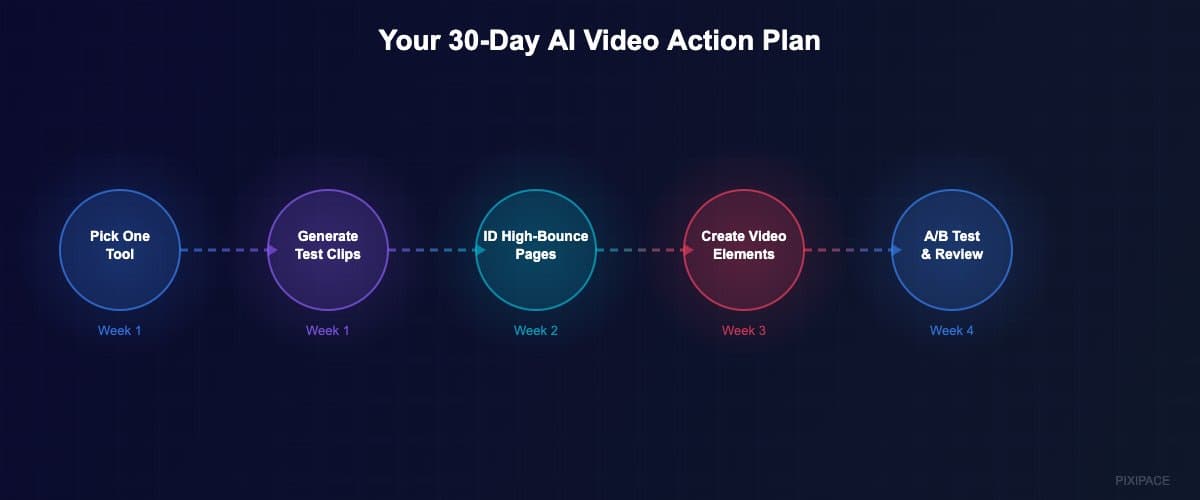
Week One: Pick one tool. I'd start with Kling 3.0 for general marketing or Veo 3.1 for cinematic quality. Sign up for the free tier. Generate 10 test clips using prompts related to your brand. Get comfortable with what works and what doesn't.
Week Two: Identify three pages on your website with the highest bounce rates. These are your test subjects. Create AI-generated video elements — hero backgrounds, section dividers, or product animations — for each one.
Week Three: A/B test the video-enhanced pages against the originals. Track bounce rate, time on page, and conversion rate. You need data, not opinions.
Week Four: Review the numbers. If you see improvements (and based on what I've seen, you will), start planning a systematic rollout. Budget roughly $400-800 for a month's worth of AI video content. Compare that to what you'd pay a production company for a single 60-second spot.
07 — The Bottom Line
Sora died because OpenAI couldn't make the economics work at scale. But the technology Sora represented didn't die with it — it scattered across half a dozen competitors who learned from OpenAI's mistakes and built leaner, meaner products.
Your website visitors in 2026 expect motion, expect video, expect visual richness that static images can't deliver. The tools to create that richness just got 91% cheaper and 99% faster. The companies that figure this out first won't just have prettier websites.
They'll have faster-converting ones.