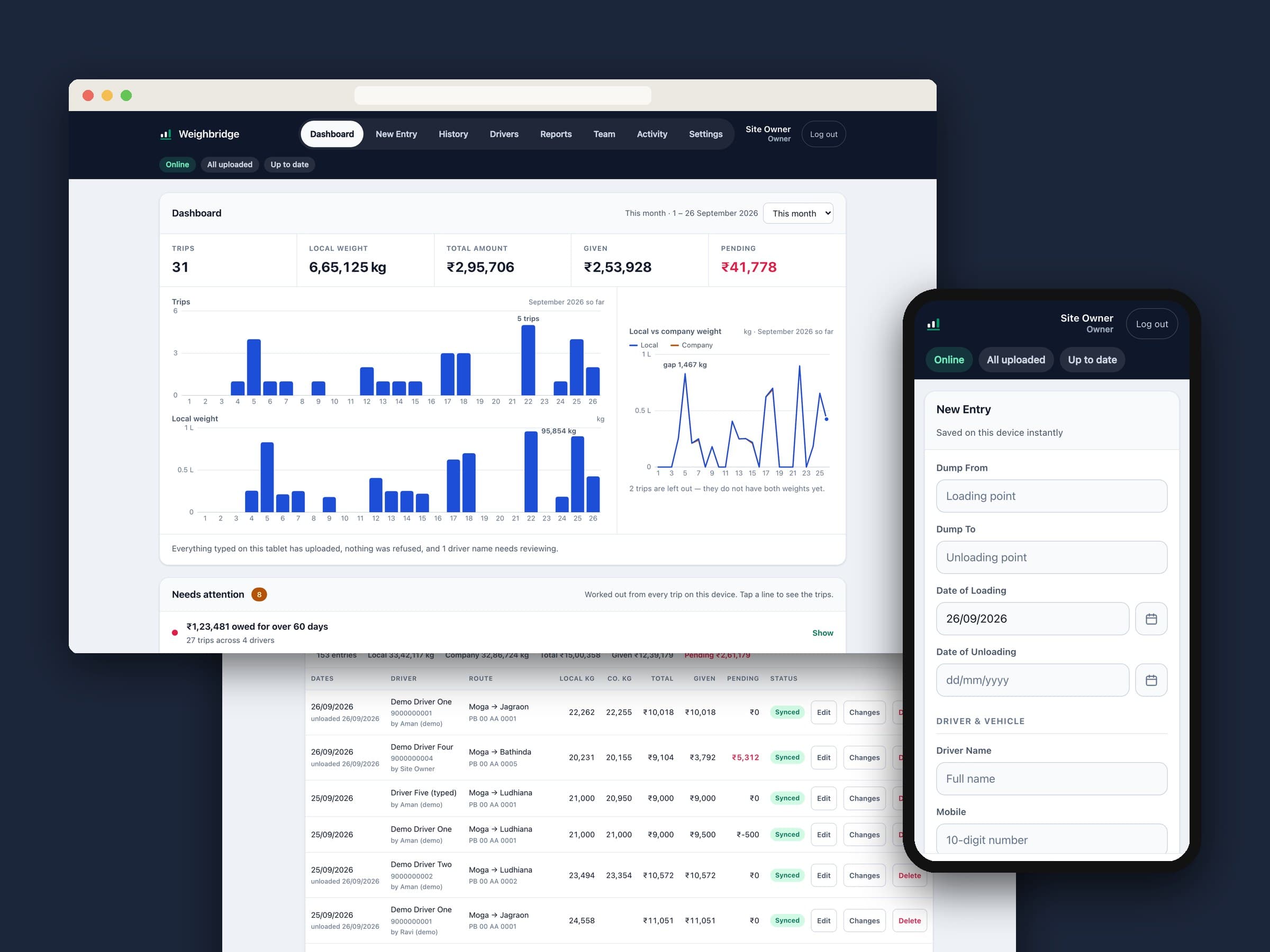
This is the app Parm's team uses to record every truck that crosses his weighbridge and every rupee paid to its driver. It runs on tablets at a site where the internet comes and goes, so it was built offline-first: a trip saves on the tablet the instant it's typed and uploads on its own whenever a connection turns up. Nothing waits for the network, and nothing typed is ever quietly lost.
01 — At a glance
| Client | Parm — owner of a weighbridge business in India |
|---|---|
| Who uses it | Site staff entering trips on tablets, and the owner and office reading the numbers |
| What we built | Trip and payment entry, driver profiles and statements, owner dashboard, monthly and yearly reports, Excel export, team roles and permissions, activity log |
| Stack | Plain HTML, CSS and JavaScript (no framework), installable web app, Firebase Auth, Firestore and Hosting |
| Timeline | About a month, from a first version on Google Sheets to the app it is today |
Every screenshot on this page uses made-up demo data. No real driver, vehicle or amount is shown.
02 — The brief
Each load is weighed twice: once on Parm's own weighbridge and again at the company it's delivered to. Every trip carries two weights, two receipt numbers, a route, a driver, a vehicle and a payment, some paid on the day and some settled later. Knowing who is owed what, and spotting when the two weights disagree, is the whole job.
Two facts shaped every decision. The people typing are not technical, and the network at the site genuinely drops. So the rule became:
An entry must never fail because of the network, and an entry that was typed must never silently disappear.
03 — Built for a bad connection
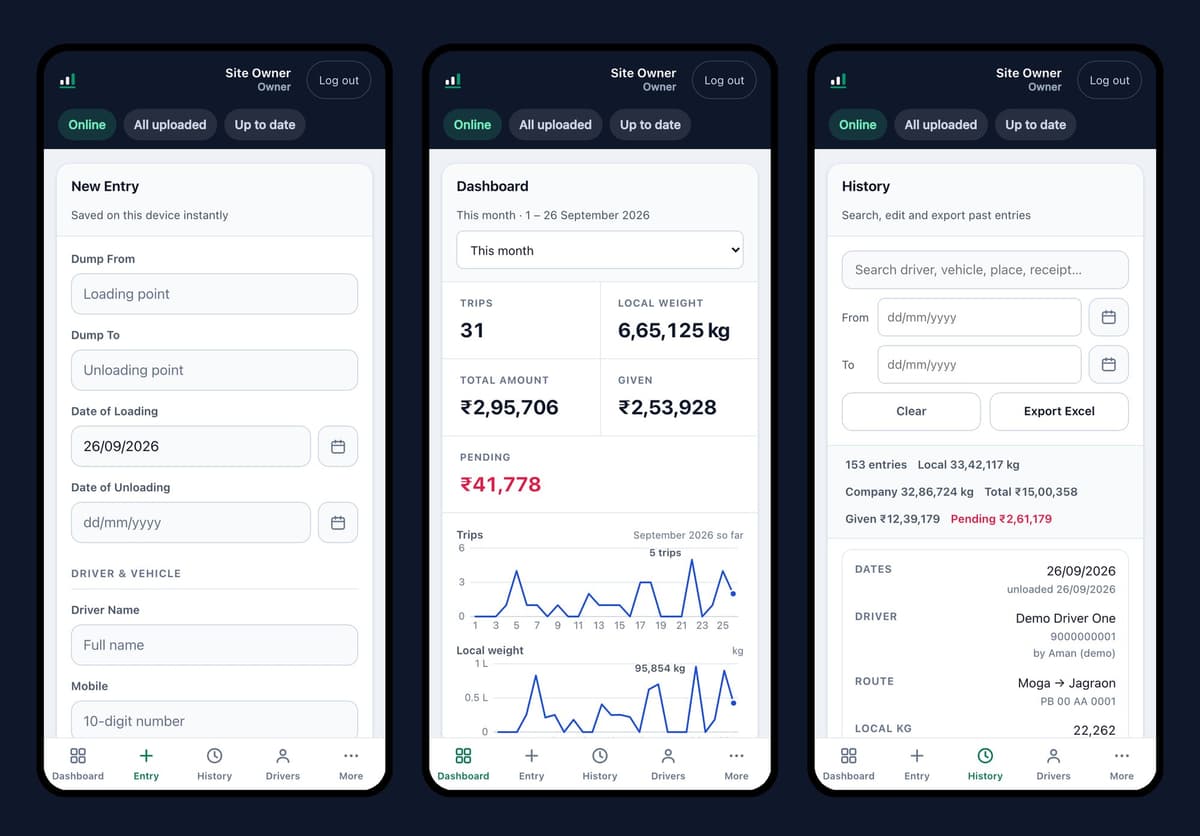
The first version saved to a Google Sheet. It proved the idea, and a little over three weeks later the app moved to Firebase, with the database kept on each tablet and a proper upload queue behind it.
- Saved before it's sent. Pressing Save never waits for the server. The trip is on the tablet straight away and goes up when it can, even if the app is closed and opened again in between.
- Nothing lost without a word. If the server ever turns an entry down, it isn't dropped. It comes back as a card with Try again and Discard, so the person who typed it decides.
- Honest status. Chips at the top say whether the tablet is online, whether everything has uploaded, and when it last synced. They turn amber when the figures may be out of date, so the owner can tell this morning's numbers from last week's.
- Shared tablets. The signed-in name is on every screen, and if someone's trips are still waiting to upload when the tablet changes hands, the app says whose and how many.
- Cheap to run. Tablets download only what changed since they last synced, not everything, which helps keep the app within Firebase's free plan.
04 — A dashboard that points at problems
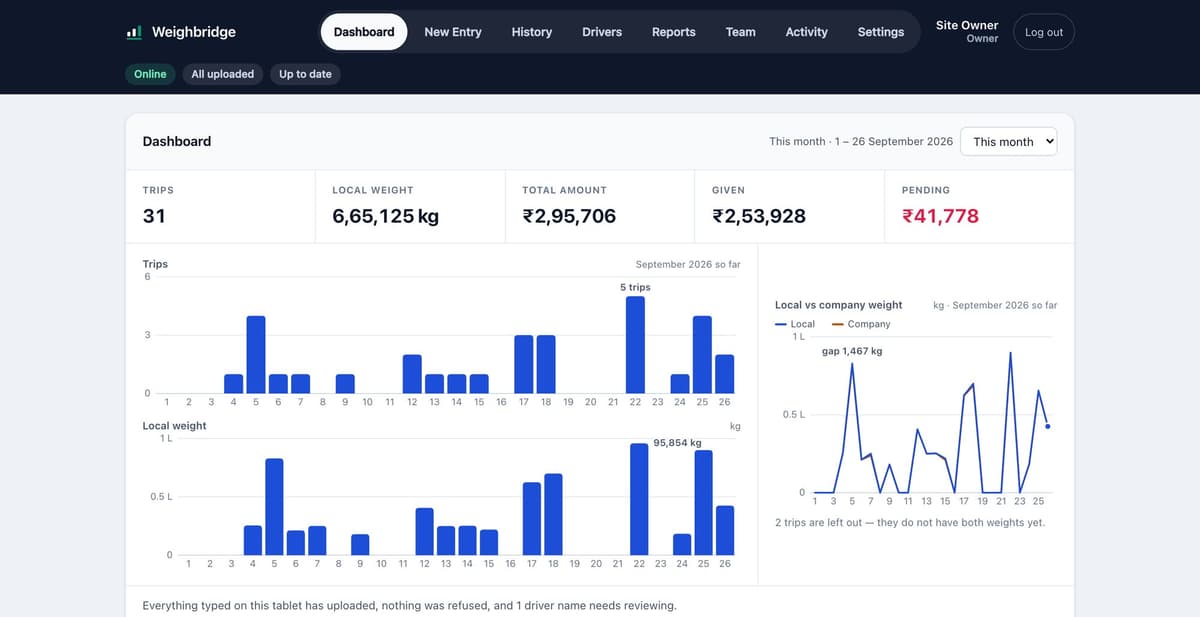
The owner's dashboard doesn't stop at totals. A Needs attention list works through every trip on the tablet and flags what a person should look at. Each line opens exactly the trips it's about.
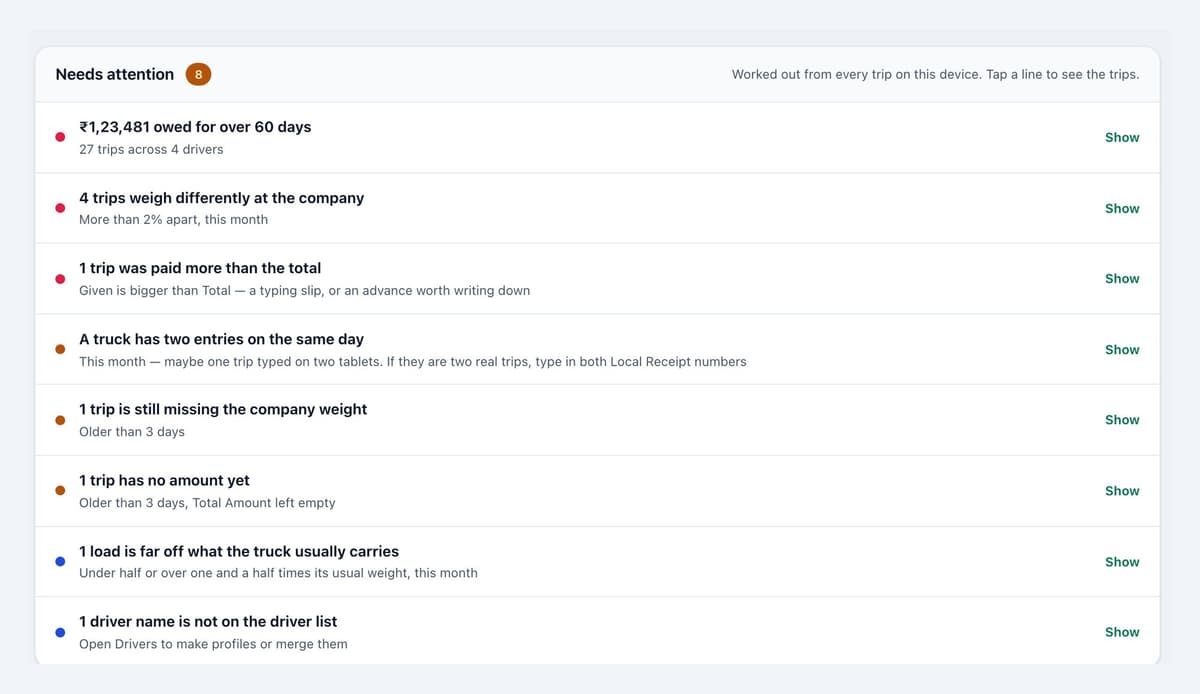
- Money: amounts owed for over 60 days, a trip paid more than its total, a Pending figure that doesn't add up, a trip with no amount after three days.
- Weights: a load that weighs differently at the company, a missing company weight, a load far off what that truck usually carries.
- Typing slips: the same truck entered twice on one day, a date that looks wrong, a driver name that isn't on the driver list.
Beneath that, the dashboard shows who owes what, how old each debt is, how each driver, vehicle and route did in the period, and who entered what.
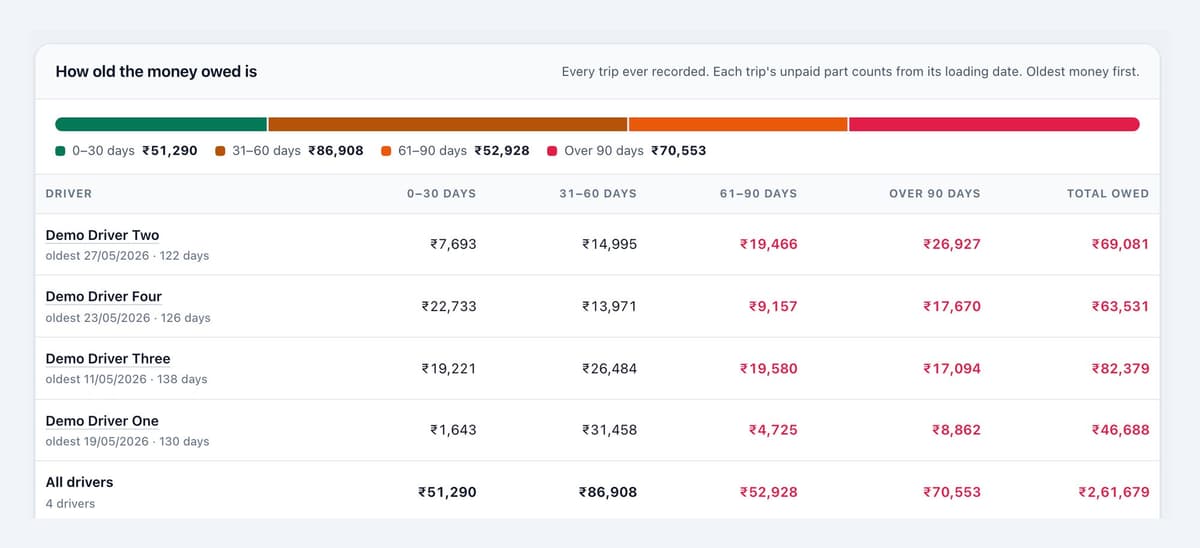
Each driver has a profile page with their trips, their balance and a printable statement to hand over when they're paid. Monthly and yearly reports export to Excel in a format that opens correctly with rupee signs and dates on any computer.
05 — The right access for each person
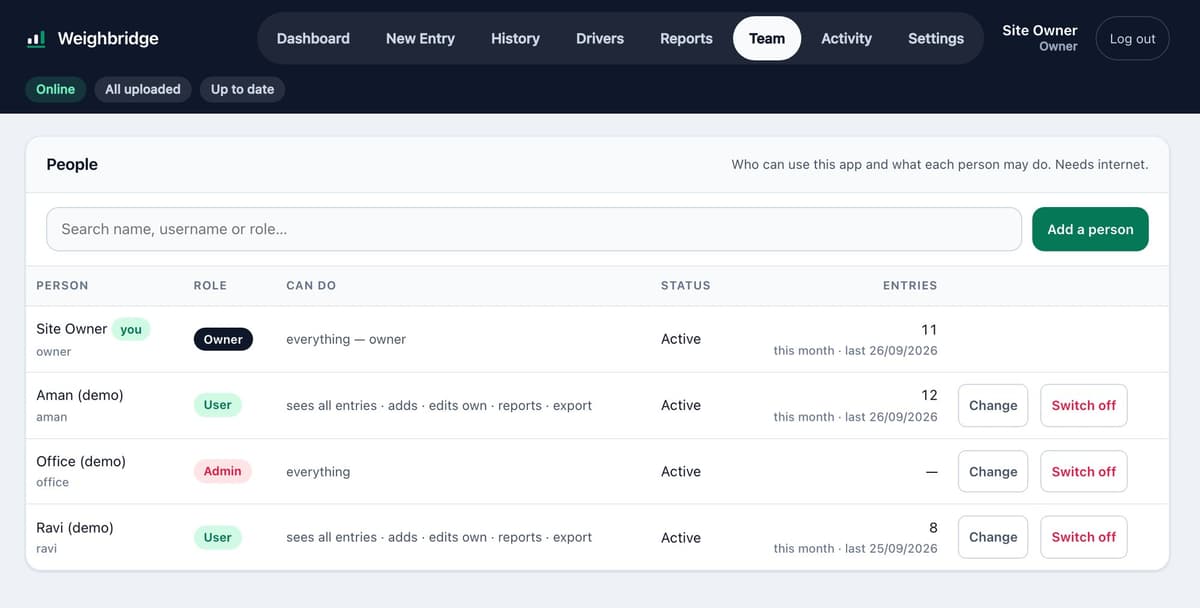
Not everyone should see the money. Access is set per person with thirteen permissions, from adding trips and editing your own to seeing every entry, managing drivers, reading the dashboard and exporting. Ready-made roles (Admin, Manager, User, Entry only, Viewer) cover the common cases, and anything else can be ticked by hand.
- The owner can't be locked out. Parm's owner rights are tied to his account itself, so no setting anyone changes can take them away.
- Checked on the server too. Hiding a button is only the start: the database checks every read and write against the same permissions, so a hidden screen can't be reached another way.
- Ask for access. A new worker can request an account from the sign-in page, and it appears on the Team screen for approval.
- An activity log nobody can edit. Who added, changed or deleted what is recorded, and entries are never hard-deleted, so there is always a trail.
- Driver ID kept separate. A driver's Aadhaar number is stored apart from the profile and shown only to people allowed to see it.
06 — Tested before handover
Every role was tested against every kind of record on a local copy of the database, and the hard cases were replayed on two "tablets" side by side: entering trips offline, restarting, reconnecting, handing the tablet over. A full review of the code then found 54 issues, all fixed before the latest version went live. The site team also has a two-page guide written in plain words.
The result is a tool built around how the site actually works: trips go in whatever the signal is doing, and the owner can see who is owed what, and where to look, in one place.